Debugging a WAF in Front of Scaleway Serverless Containers
Table of Contents
I run a public ModSecurity and OWASP CRS WAF in front of an IAM-private application container. My goal is to make the WAF the intended public entry point and the only deployed component that holds the origin credential. “Private” here means that Scaleway requires X-Auth-Token authentication; the generated application endpoint remains reachable at the provider edge.
This post documents how I implemented and debugged that architecture with Scaleway Serverless Containers. It is not an argument that every application needs a WAF. The problems described here—host-based routing, upstream TLS verification, and redirect handling—come from putting a credentialed reverse proxy in front of a private origin. This is the final configuration I arrived at after resolving a routing loop, upstream TLS failures, and leaked redirect URLs.
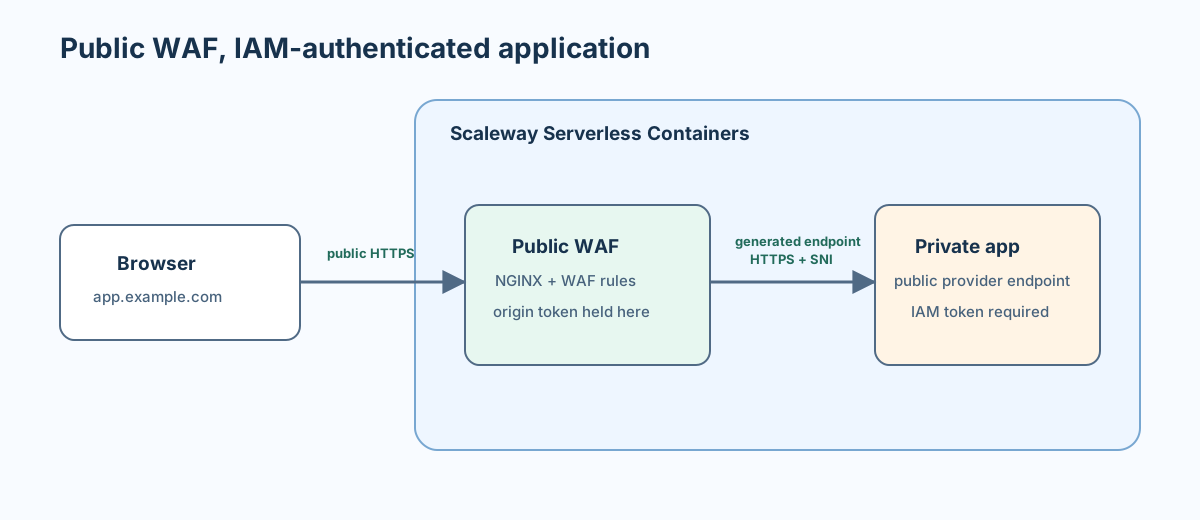
There are two distinct names:
| Name | Example | Job |
|---|---|---|
| Public hostname | app.example.com | Browser address and redirect destination. |
| Generated upstream hostname | private-app.provider.example | Routes the WAF request through the serverless ingress to the application. |
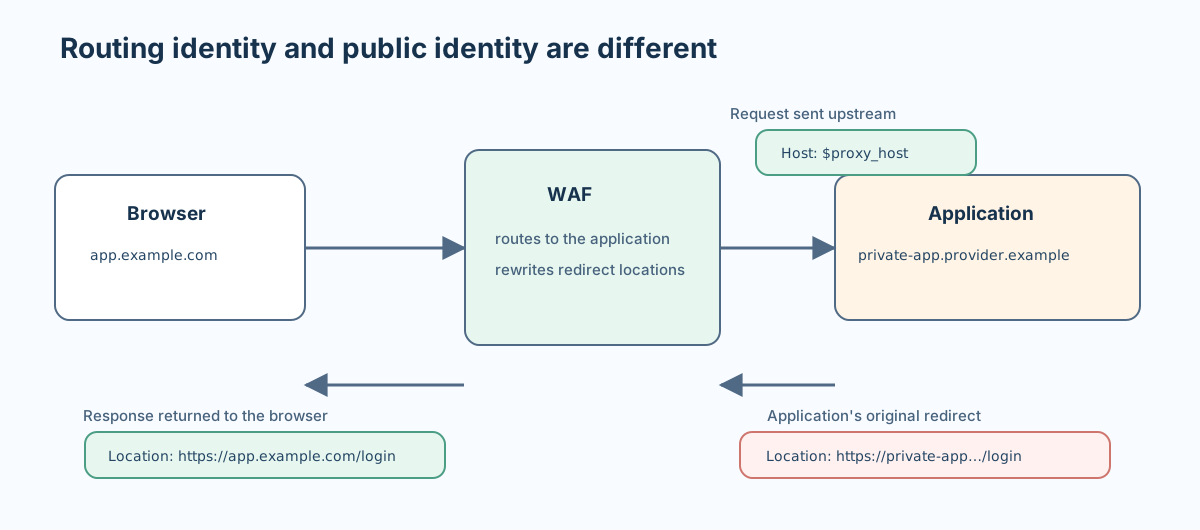
Keeping those roles separate was the key to the whole design. The debugging sequence became: route the upstream request to the right container, verify that connection, then translate browser-facing redirects back to the public domain.
Why ModSecurity and the OWASP Core Rule Set #
The WAF image uses ModSecurity with the OWASP Core Rule Set (CRS), served by NGINX. ModSecurity supplies the inspection engine; CRS provides maintained, broadly useful rules for common web attack patterns. That is a better starting point than writing a collection of application-specific regular expressions at the proxy.
I chose this combination because it is open source, portable, and available as an official NGINX container image. It also keeps the concern at the HTTP boundary: the application remains responsible for authentication, authorization, validation, and business rules, while the WAF adds a layer of generic request inspection.
A rule set is not plug-and-play protection. Start in DetectionOnly mode, review audit logs, add narrow exclusions for understood false positives, and enable blocking only when the observed traffic supports it. Pin the image by version and digest so rule updates are intentional and testable.
It is also not a DDoS solution or network isolation. A private Scaleway container still has a provider endpoint, but requests to it require a valid X-Auth-Token. Platform-level rate limiting and volumetric protection are separate concerns.
First, route upstream requests with the generated hostname #
My initial proxy configuration explicitly preserved the incoming host, a common choice when an application needs to see its public hostname:
proxy_set_header Host $http_host;
This was an override rather than an NGINX default: the proxy module normally sets the upstream Host to $proxy_host.
That is unsafe in this topology. If app.example.com resolves to the WAF, sending that host back through the provider’s shared ingress can route the WAF’s origin request to itself:
WAF -> shared ingress -> WAF -> shared ingress -> ...
In my case, the loop appeared as the misleading error 400 Request Header Or Cookie Too Large. No browser cookie needed to be large; each pass appended forwarding headers until NGINX rejected the request.
The origin request must instead use the generated hostname:
proxy_set_header Host $proxy_host;
When proxy_pass uses the generated application endpoint, $proxy_host is that endpoint’s hostname. The serverless ingress can therefore deliver the request to the application container.
Then, verify the origin certificate, including its chain #
The WAF should not disable TLS verification simply because the upstream is a generated provider endpoint. It sends an origin credential, so it must verify it reached the intended origin.
proxy_ssl_server_name on;
proxy_ssl_name $proxy_host;
proxy_ssl_trusted_certificate /etc/ssl/certs/ca-certificates.crt;
proxy_ssl_verify on;
proxy_ssl_verify_depth 3;
SNI (proxy_ssl_server_name) and proxy_ssl_name make the TLS request match the generated endpoint. proxy_ssl_verify validates its certificate against the container image’s CA bundle.
The explicit verification depth is easy to overlook. Managed endpoints can present a leaf certificate followed by several intermediate certificates before a trusted root. NGINX’s proxy_ssl_verify_depth defaults to 1, which may reject a valid chain; setting a depth that accommodates the presented chain preserves verification rather than weakening it.
Once routing worked, upstream failures still appeared in the browser only as a 502. The proxy error log exposed the actual cause, and these messages pointed in very different directions:
connect() failed        -> DNS, network, address-family, or firewall issue
SSL handshaking failed  -> SNI, CA bundle, certificate, or verification-depth issue
For containers, writing errors to standard error makes them available in Scaleway Cockpit Logs:
error_log /dev/stderr info;
Finally, rewrite redirects at the WAF boundary #
After fixing routing and TLS, the next symptom was an absolute application redirect using the generated hostname:
Location: https://private-app.provider.example/login
The browser must not be sent to that internal implementation address. Rewrite that response at the public boundary instead of changing the upstream Host header:
proxy_redirect https://$proxy_host/ https://${PUBLIC_HOST}/;
PUBLIC_HOST should be an explicit, deployment-specific value such as app.example.com, not a reflected request header. That keeps redirect destinations allowlisted and makes the public address deliberate configuration.
proxy_redirect changes only Location and Refresh response headers. The application still needs its public URL when it generates links in HTML, API responses, emails, or OAuth callbacks. Configure an explicit external base URL in the application where possible. Alternatively, pass the allowlisted public name as X-Forwarded-Host and configure the application to trust that header only from the WAF. Domain-scoped cookies need separate handling, such as application configuration or proxy_cookie_domain.
A compact configuration #
The relevant excerpt from my WAF configuration is below. It omits the surrounding TLS listener, ModSecurity rule configuration, request limits, and other deployment-specific settings.
In the official CRS image, save this as an NGINX template, for example /etc/nginx/templates/conf.d/default.conf.template; its startup process expands ${ORIGIN_AUTH_TOKEN} and ${PUBLIC_HOST}. Plain NGINX does not expand environment variables in configuration files without this preprocessing.
location = /livez {
    access_log off;
    default_type text/plain;
    return 200 "ok\n";
}

location / {
    proxy_pass https://private-app.provider.example;
    proxy_http_version 1.1;

    # Scaleway ingress routing
    proxy_set_header Host $proxy_host;

    # Request context and WAF-to-origin authentication
    proxy_set_header X-Forwarded-For $proxy_add_x_forwarded_for;
    proxy_set_header X-Forwarded-Proto https;
    proxy_set_header X-Forwarded-Port 443;
    proxy_set_header X-Forwarded-Host ${PUBLIC_HOST};
    proxy_set_header X-Auth-Token ${ORIGIN_AUTH_TOKEN};

    # Authenticated TLS to the origin
    proxy_ssl_server_name on;
    proxy_ssl_name $proxy_host;
    proxy_ssl_trusted_certificate /etc/ssl/certs/ca-certificates.crt;
    proxy_ssl_verify on;
    proxy_ssl_verify_depth 3;

    # Browser-facing URLs
    proxy_redirect https://$proxy_host/ https://${PUBLIC_HOST}/;

    proxy_connect_timeout 10s;
    proxy_read_timeout 120s;
    proxy_send_timeout 120s;
}
The origin token is the secret key of a dedicated Scaleway IAM API key. Give its IAM application the ContainersPrivateAccess permission and no unrelated access, using an IAM condition if it must be restricted more narrowly than the project. Store the key in the container platform’s secret configuration, never in the image or repository.
The short connection timeout and longer read timeout are intentional: waiting can be reasonable after a connection succeeds, for example during a cold start; a connection that cannot be made promptly is normally a different problem.
Separate WAF liveness from origin readiness #
The WAF and application need different health checks:
GET /livez   -> is the WAF process accepting requests?
GET /readyz  -> can the WAF reach the authenticated application health endpoint?
Use the local /livez endpoint for the WAF container’s startup or liveness probe. According to Scaleway’s health-check documentation, repeated liveness failures mark the container as errored and stop traffic from being routed to it rather than restarting it. A failed origin must therefore not remove a healthy WAF from service; the WAF is the component needed to inspect the failure.
Use proxied /readyz in deployment smoke tests. It covers the entire path: WAF, upstream TLS, serverless routing, origin authentication, and application health. A final redirect assertion completes the basic checks:
curl -fsS https://app.example.com/livez
curl -fsS https://app.example.com/readyz
curl -sSI https://app.example.com/ \
    | tr -d '\r' \
    | grep -Fxi 'Location: https://app.example.com/login'
The useful mental model is to treat upstream routing, TLS identity, and browser-facing URLs as separate responsibilities. The generated hostname is for Scaleway’s ingress, TLS validates that generated endpoint, and the public hostname is explicit application and browser context rather than the upstream routing key. Keeping those concerns apart avoids proxy loops and prevents redirects from leaking the origin URL.